Conversations page
Every conversation, read and summarised, in one place.
Conversations is the full record of every customer conversation Isara has read from your connected helpdesk. Each row tells you what happened, who handled it and how the customer felt, so you can find the right conversation in seconds instead of scrolling through your helpdesk.
Why Conversations matters
- Find any conversation by date, agent, customer or quality signal.
- Understand what happened without opening the transcript, thanks to an AI summary on every row.
- Prioritise the conversations that went worst, so your team reviews what matters first.
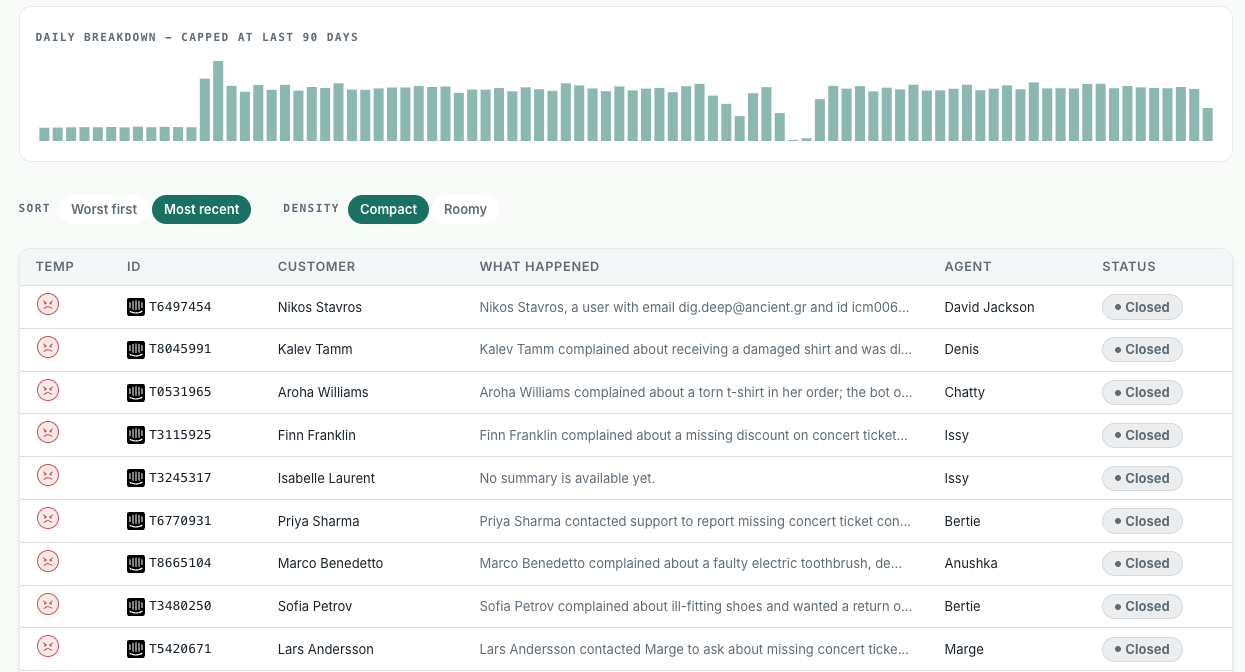
What you see
Daily breakdown
A bar chart at the top shows conversation volume per day, capped at the last 90 days. Spikes and gaps stand out at a glance, which helps you spot incidents, campaigns or helpdesk sync issues. The counter under the page title shows how many conversations match your current filters.
The conversation list
Each row is one conversation:
- Temp: the customer’s emotional temperature, shown as a face icon.
- ID: the ticket ID from your helpdesk, with the source helpdesk’s logo.
- Customer: the person who contacted you.
- What happened: an AI summary of the issue, what the agent did and how it ended.
- Agent: the human agent or AI bot who handled it.
- Status: open or closed, as reported by your helpdesk.
Sort and density
Sort by Most recent or Worst first. Worst first brings the most negative conversations to the top. Switch density between Compact and Roomy to fit more rows or read longer summaries.
How teams use it
- Daily review: sort by Worst first and work through the most negative conversations before they turn into churn.
- Agent coaching: filter by agent and quality to find real examples for one-to-ones.
- Bot QA: filter by agent type Bot to see where your AI agent fails customers.
- Investigations: upload a list of conversation IDs, or set a date range around an incident, to see exactly what customers experienced.