Now
Now shows the signals that need your attention, ranked by priority, across conversations, customers, users and topics. Learn how to review, dismiss and track them.
What is Now?
Now shows you what needs your attention today, ranked by priority. It replaces Pulse.
Now is built on signals. A signal is something Isara has detected in your conversations that is worth acting on, such as a cancellation request, a drop in satisfaction or a conversation that was left unanswered.
Isara keeps watching after a signal is raised. It updates the signal as new conversations come in, and closes it when the issue is no longer happening.
To open Now, click Now under Work in the left menu.
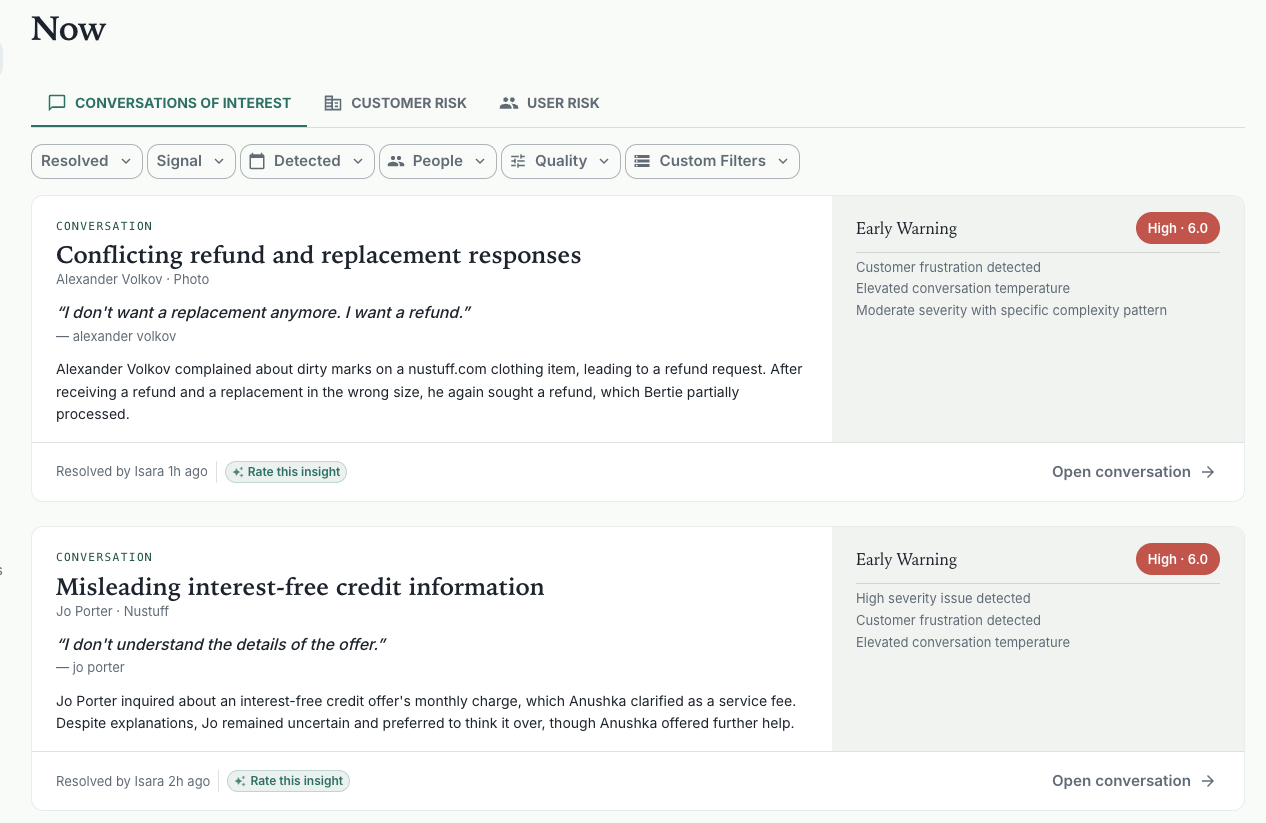
The four tabs
Now groups signals into four tabs, depending on what the signal is about.
- Conversations of interest: individual conversations that need a look, with a short summary and a key quote from the customer. Click Open conversation to read it.
- Customer risk: companies (organisations) at risk, based on everything Isara has seen across their conversations. Click Open org to see the company.
- User risk: individual end users at risk, based on their own conversations. Click Open user to see the user.
- Topic anomalies: topics that come up much more often in unsatisfied conversations than in your conversations overall. Click Open topic to see the topic.
Which risk tabs you see depends on the business type selected in Organization info:
- We sell to other businesses (B2B): you see Customer risk.
- We sell to other consumers (B2C): you see User risk.
- We serve both businesses and consumers: you see both.
Conversations of interest and topics are available to everyone.
Each card shows a summary of what is happening, the signals that fired and the date Isara first saw them.
Priority
Every card has a priority level and a score out of 10. Cards are sorted with the highest score first, so the most urgent items are always at the top.
- Critical: act now. There is a clear and serious risk.
- High: act soon. The risk is significant.
- Medium: keep an eye on it.
- Low: worth knowing about, no urgent action needed.
The score is based on how serious the signals are and how many of them fired. For topic anomalies, the score is based on how much more common the topic is in unsatisfied conversations.
Signals
Isara detects many types of signal and adds new ones over time. Each card shows which signals fired, so you can see at a glance why it is in your list.
Conversations of interest
Each conversation is flagged with one of two signals:
- Priority intervention: a critical issue in recent messages that needs someone to step in now.
- Early warning: warning signs that could turn into a bigger problem if nobody acts.
The card also lists the reasons behind the signal, such as high customer frustration, legal concerns or a high conversation temperature.
Customer risk and User risk
Company and user cards are built from one or more signals, for example a cancellation request, low satisfaction with the product or support, a rise in escalations or a customer going quiet.
The card shows how many signals fired and since when.
Topic anomalies
Each topic is flagged with one signal:
Topic anomaly: the topic is much more common in unsatisfied conversations than in all scored conversations over the last 7 days.
The card shows how many times more common the topic is, how many unsatisfied conversations were about it and its topic family: Product, Service or Context.
Working with a signal
See the history
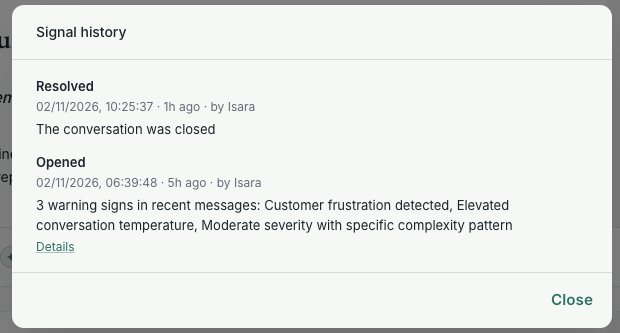
Click the Detected by Isara… text at the bottom of a card to open the Signal history. It shows when the signal was opened, what triggered it and every update since. Click Details on any entry to see more.
The same line tells you when Isara first detected the signal and when it was last active, for example Detected by Isara 20d ago · active 6h ago.
 ### Dismiss a signal
Click Dismiss to hide a signal you have already handled. It moves to Dismissed.
Dismissing does not switch the signal off for good. If Isara detects a new relevant event, the signal comes back to Needs attention.
Automatic closing
You do not need to close signals yourself. When Isara decides a signal is no longer relevant or no longer happening, it closes it automatically and moves it to Resolved.
Rate an insight
Click Rate this insight to tell us whether a signal was useful. Your feedback helps Isara get better at spotting what matters to you.
Filters
Use the filters at the top of each tab to narrow the list, for example by signal, priority or detection date. You can also search for a company or user by name.
The first filter sets which signals you see:
- Needs attention (default): open signals waiting for action.
- Dismissed: signals you or your team have dismissed.
- Resolved: signals Isara has closed automatically.