Users
See every person who contacts you, how their experience is going and who is at risk of leaving.
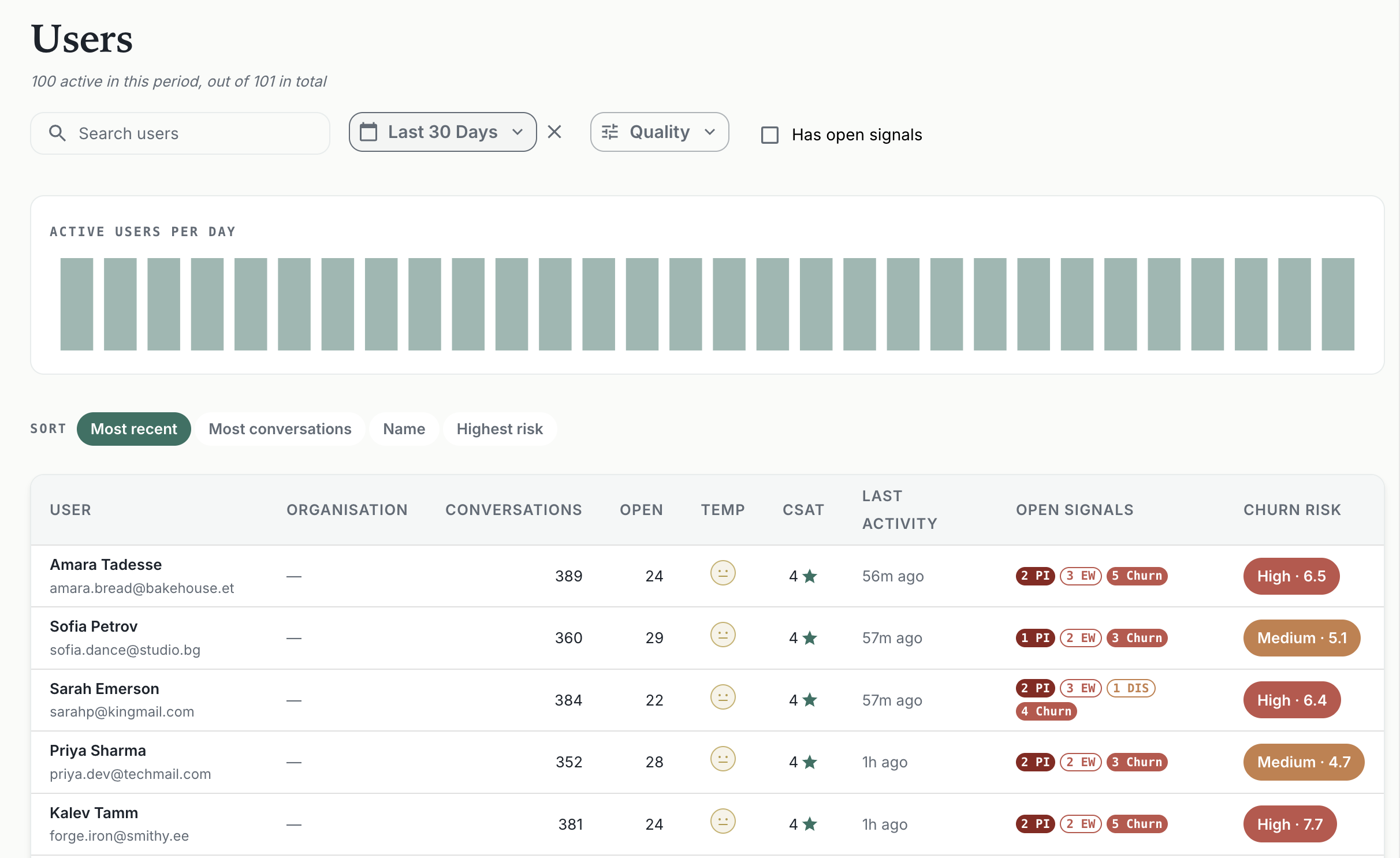
Users brings together every conversation from the same person. You see how often they contact you, how they feel and the signals Isara has raised about them, so you can step in before a frustrated customer walks away.
To open it, click Users under Data in the left menu.
 ### Why Users matters
- Spot individual customers at risk of churning, based on their own conversations.
- See a customer’s full history in one place before you reply to them.
- Find your most frequent contacts and understand why they keep coming back.
Filters
- Search users: find a person by name or email.
- Date range: the period the figures cover. The default is Last 30 Days. Click the cross to clear it.
- Quality: filter by temperature (Cool, Neutral, Warm, Hot) or customer satisfaction (1 to 5 stars).
- Has open signals: show only users with at least one open signal.
The counter under the page title shows how many users were active in the period, out of the total.
Active users per day
A bar chart shows how many users contacted you each day in the selected period.
The user list
Each row is one user:
- User: the person’s name and email address.
- Organisation: the company they belong to, if your helpdesk links them to one.
- Conversations: the total number of conversations from this user.
- Open: how many of those conversations are still open.
- Temp: the average temperature across their conversations.
- CSAT: their average satisfaction score, out of 5.
- Last activity: when they last contacted you.
- Open signals: the signals Isara has raised and not yet closed. Hover over a badge to see what it means.
- Churn risk: the risk level and score out of 10.
The open signal badges are:
- PI: open priority interventions. A conversation needs someone to step in now.
- EW: open early warnings. Warning signs that could grow into a bigger problem.
- DIS: open disengagements. The customer stopped replying.
- Churn: open churn signals, such as a cancellation request or low satisfaction with the product.
Sort
- Most recent: the most recently active users first.
- Most conversations: the users who contact you most first.
- Name: alphabetical.
- Highest risk: the users with the highest churn risk first.
Churn risk
Every user with open churn signals gets a churn risk level and a score out of 10.
- Critical: act now. There is a clear and serious risk the customer will leave.
- High: act soon. The risk is significant.
- Medium: keep an eye on it.
- Low: worth knowing about, no urgent action needed.
The score is based on how serious the signals are and how many of them fired.
The user page
Click a user to open their page. It shows:
- Key figures: temperature, CSAT, churn risk, open signals, conversations (with how many are open) and organisation.
- Churn risk signal: a summary of why the user is at risk, the risk level and score, and every signal that fired since Isara first saw it. For example, Cancellation Request, Payment Discussion or Low Product Satisfaction.
- Conversations: every conversation from the user. Click an ID to open the conversation.
Under the churn risk signal you can:
- Rate this insight: tell us whether the signal was useful.
- Dismiss: hide a signal you have already handled. If Isara detects a new relevant event, it comes back.
The Detected by Isara line shows when Isara first raised the signal and when it was last active.
How teams use it
- Retention outreach: sort by Highest risk and contact the users most likely to leave.
- Before you reply: search for a customer to read their history and current mood.
- Repeat contacts: sort by Most conversations to find people who keep coming back, and fix the reason.